

When you’re investing in an LED display screen or video wall, understanding pixel pitch can mean the difference between a stunning visual experience and a disappointing one.
Pixel pitch is the distance from the center of one LED pixel to the center of the adjacent pixel, measured in millimeters, and it directly determines your display’s resolution and image quality.
Quick answer: Pixel pitch is the distance in millimetres from the centre of one LED pixel to the next, so a P2.5 screen has 2.5 mm between pixels. A smaller pitch packs more pixels into the same area, giving a sharper image that can be viewed up close, but it costs more. Indoor screens typically use about 1.2–3 mm, while outdoor screens use larger pitches of about 4–16 mm because viewers stand further away.
Pixel pitch describes the density and arrangement of pixels (also known as dot pitch) on an LED display, which is crucial for achieving clear visuals on both LED screens and LED walls.
A smaller pixel pitch means pixels are packed more closely together, resulting in higher resolution and sharper images.
The smaller the pixel pitch, the higher the resolution and image clarity, which is especially important for indoor applications like a conference room or other indoor screens.
Pixel pitch directly impacts resolution, image quality, optimal viewing distance, and even higher costs, as low pixel pitch displays require more LED clusters and advanced manufacturing.
Your choice of pixel pitch depends on where viewers will stand in relation to your display. Pixel pitch important because it determines how close viewers can get to the screen without seeing individual pixels, making it essential to select the right pitch for your application and board size.
LED pixel pitch is a key specification for both LED screens and LED walls, affecting how many pixels fit within a given area and ultimately defining the screen resolution and pixel size.
If you select a pixel pitch that’s too large for close viewing, your audience will see individual pixels and gaps between them rather than a smooth image. For outdoor screens, a larger pixel pitch is typical, while indoor screens benefit from a low pixel pitch for maximum impact and clear visuals.
Conversely, choosing an unnecessarily small pixel pitch for distant viewing wastes budget without improving the visual experience.
Why pay more for something nobody can see? Smaller pixel pitch means higher costs, so it’s important to balance your needs and determine acceptable viewing distance.
Use industry guidelines, such as the shorthand method or general rule, and consider metrics like average comfortable viewing distance, visual acuity, visual acuity distance, and retina distance.
This guide will help you understand how pixel pitch affects display quality, calculate the optimal viewing distance for different applications, and make informed decisions about which pixel pitch suits your specific needs.
What is Pixel Pitch?
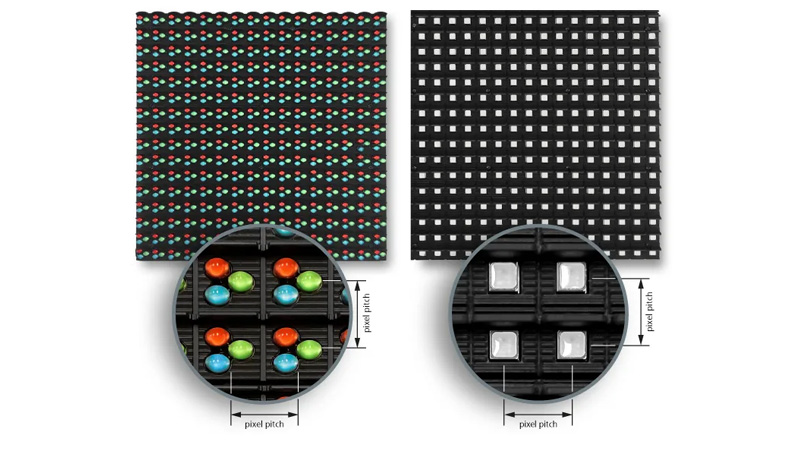
Pixel pitch defines the spacing between individual pixels on a display and directly determines how sharp or detailed your image appears.
When considering pixel pitch vs other metrics like PPI (pixels per inch), it’s important to note that pixel pitch is measured in millimeters and is commonly used for large LED displays, while PPI is used for smaller screens like smartphones and measures pixel density per inch.
Measuring this distance involves simple millimeter calculations, and the relationship between pitch size and pixel density affects how you experience visual content.
In other display technologies, this measurement is often referred to as dot pitch, which similarly impacts resolution and image clarity. It’s not rocket science, but it’s easy to overlook.
Definition of Pixel Pitch
Pixel pitch is the distance from the center of one pixel to the center of the adjacent pixel on a display screen. In LED displays, each pixel is formed by a group of LEDs known as LED clusters.
This measurement determines the physical space between each light-emitting point on your screen, also referred to as pixel size. Pixel size and pixel pitch are closely related—smaller pixel pitch means smaller pixel size, which increases pixel density and improves image clarity.
You’ll find pixel pitch expressed in millimeters.
A smaller pixel pitch means pixels are packed more closely together, resulting in higher image resolution. Conversely, a larger pixel pitch spreads pixels farther apart, which reduces resolution.
The pixel pitch you choose affects your viewing experience significantly.
Displays with tight pixel spacing deliver sharper images with more detail, while those with wider spacing work better for viewing from greater distances.
How Pixel Pitch Is Measured
Pixel pitch measurement calculates the distance between the centers of two adjacent pixels, not the edge-to-edge spacing.
You measure this distance in millimeters, typically ranging from less than 1mm to 10mm or more depending on the display type.
The measurement applies uniformly across both horizontal and vertical directions.
Your display’s pixel pitch remains consistent throughout the entire screen surface. No weird surprises in the corners or edges.
Manufacturers specify pixel pitch as a single value, such as P1.5 or P6, where the number indicates the millimeter measurement.
A P2.5 display has 2.5mm between each pixel center.
To find out how many pixels fit within a specific length or area, simply divide the physical measurement (like width in millimeters) by the pixel pitch.
This helps you determine how many pixels are present across a given distance, which is important for understanding display resolution and clarity.
Pixel Pitch and Pixel Density
Pixel density refers to the number of pixels contained within a specific area of your screen, typically measured in pixels per inch (PPI) or pixels per square meter.
Pixel pitch and pixel density have an inverse relationship. Smaller pitch, higher density—simple math.
When your display has a smaller pixel pitch, you get higher pixel density because more pixels fit into the same space.
This increase in pixel density results in a higher screen resolution, which means the display can show clearer and more detailed images, especially important for close viewing distances.
A 2mm pixel pitch creates greater density than a 6mm pitch in equivalent screen areas. That difference is huge if you’re showing detailed content.
Your viewing distance should match the pixel pitch you select.
Higher density displays with smaller pitch values suit close-range viewing, while lower density screens with larger pitch work for applications where viewers stand farther away.
The optimal viewing distance generally ranges from 1 to 2 meters per millimeter of pixel pitch. It’s not an exact science, but it’s a solid starting point.
Pixel Pitch and Display Quality

Pixel pitch directly determines the resolution and clarity of your LED display, playing a crucial role in achieving clear visuals.
A smaller pixel pitch means pixels are packed more densely together, resulting in sharper images and smoother visuals.
It’s one of those things you notice immediately when you walk up close. Low pixel pitch is especially important for high-resolution displays, as it ensures detailed, clear visuals even at close range.
When you view a display from close range, pixel pitch becomes critical. For indoor screens, such as those used in retail stores or conference rooms, a low pixel pitch (1mm to 6mm) is ideal to maintain image clarity and comfort for viewers nearby.
Outdoor screens, on the other hand, typically use larger pixel pitches (11mm to 19mm) to remain cost-effective and visible from greater distances.
Displays with smaller pitch measurements like 1mm to 3mm deliver crisp details that remain clear even when you stand near the screen.
Larger pitch values like 10mm to 19mm work better for viewing from greater distances where individual pixels blend together naturally.
Resolution increases as pixel pitch decreases. Here’s how different pitch ranges affect display quality:
|
Pixel Pitch Range |
Best Viewing Distance |
Typical Applications |
|---|---|---|
|
1mm – 3mm |
3 – 10 feet |
Indoor displays, control rooms, conference rooms |
|
4mm – 6mm |
10 – 20 feet |
Retail stores, conference rooms, indoor screens |
|
7mm – 10mm |
20 – 40 feet |
Indoor arenas, churches |
|
11mm – 19mm |
40+ feet |
Outdoor billboards, stadiums, outdoor screens |
Your viewing distance should match the pixel pitch specification. To determine acceptable viewing distance, consider both industry guidelines and user comfort.
The acceptable viewing distance can be estimated using the general rule: the minimum viewing distance in meters is roughly equal to the pixel pitch in millimeters.
For a quick estimate, a shorthand method is to multiply the pixel pitch by a factor (such as 2 or 3) to get the distance in meters.
A 2mm pitch provides excellent quality for close-up viewing, while a 16mm pitch creates a cohesive image when viewed from across a parking lot.
The concept of visual acuity and visual acuity distance is also important—these refer to the distance at which the human eye can no longer distinguish individual pixels, sometimes called retina distance.
The average comfortable viewing distance (ACVD) is another useful metric, as it takes into account real-world comfort and installation data.
The tradeoff involves cost and application. Smaller pitch displays cost more per square foot but deliver superior image quality.
You need to balance your quality requirements with budget constraints and intended viewing distances.
Color accuracy and brightness remain consistent across different pitch values.
The primary quality difference lies in how the resolution and detail appear at your specific viewing distance.
Key takeaways:
-
Low pixel pitch is essential for high-resolution, clear visuals in indoor screens and close viewing environments like conference rooms.
-
Outdoor screens use larger pixel pitches for cost-effectiveness and visibility at greater distances.
-
Use the general rule or shorthand method to estimate acceptable viewing distance based on pixel pitch.
-
Consider visual acuity distance, retina distance, and average comfortable viewing distance when choosing the right display.
-
Always determine acceptable viewing distance for your application to ensure optimal image quality and viewer comfort.
Benefits of Lower Pixel Pitch
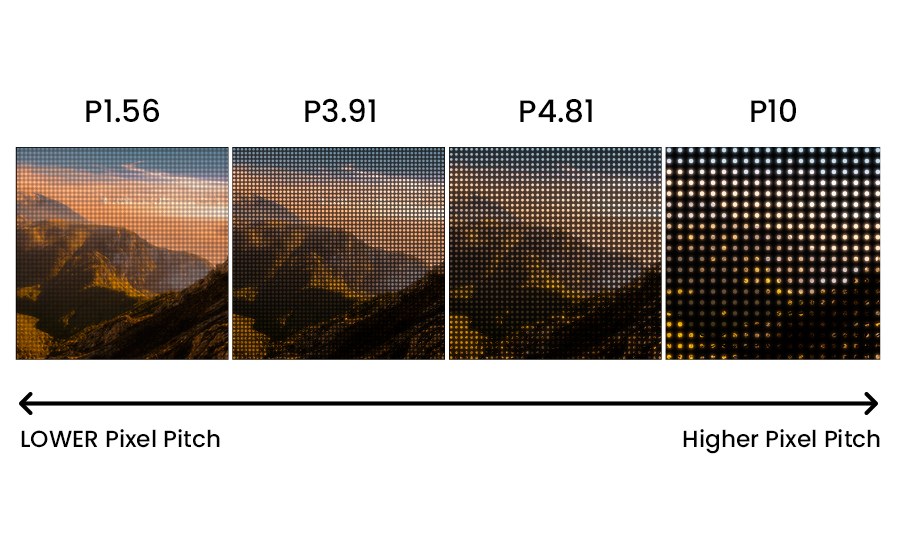
When you choose a lower pixel pitch for your LED video wall, you’re basically getting pixels that sit much closer together.
Think of it this way – more pixels crammed into the same space means you get that crisp, detailed picture quality that really makes a difference.
This can be especially important in a transparent LED display screen, where enough light has to pass between the pixels to free visibility.
Let me show you what this looks like in real numbers. Take a 1mm pixel pitch (we call it P1) and compare it to a 6mm pitch (P6) on walls that are exactly the same size.
The P1 version gives you six times better resolution simply because those pixels are six times tighter together. Here’s where it gets interesting: if you have a 16′ x 9′ wall with that 1mm pitch, you’re looking at true 4K resolution with images that look absolutely stunning.
But use a 20mm pitch on that same wall? You’re stuck with just 244×137 pixels – which won’t cut it for most things you’d want to display today.
The bottom line is pretty straightforward. Lower pixel pitch gives you more pixels packed into every square inch, and that means sharper, more impressive visuals.
This becomes really important when people will be standing close to your display – whether that’s in a control room, retail space, or conference room.
If you want your LED wall to show detailed graphics or text that actually looks professional, going with a lower pixel pitch is your best bet.
Determining Optimal Viewing Distance
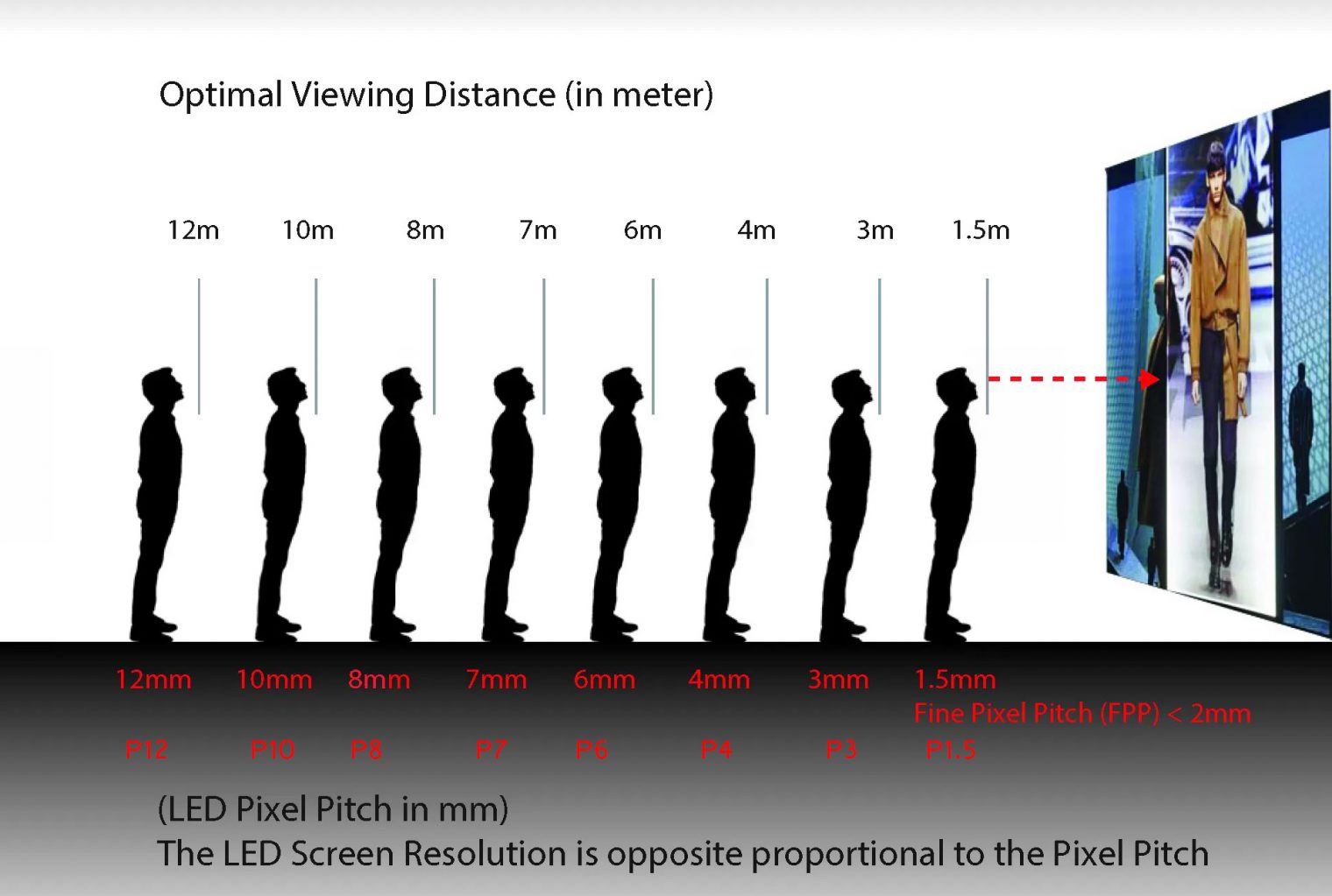
Viewing distance directly affects which pixel pitch works best for your LED display. To determine acceptable viewing distance, it’s important to consider both technical guidelines and user comfort.
The farther away viewers stand, the larger the pixel pitch can be without compromising image quality. No need to over-engineer it.
A general rule or shorthand method for estimating the minimum viewing distance is to multiply the pixel pitch in millimeters by 10 to get the distance in feet. This is a quick way to estimate the average comfortable viewing distance (ACVD) for most installations.
For example, a 10mm pixel pitch requires viewers to stand at least 10 feet away for a clear image.
This distance is often referred to as the visual acuity distance or retina distance, which is the point where the human eye (with 20/20 vision) can no longer distinguish individual pixels—optimizing visual acuity and display clarity.
Common Pixel Pitch and Viewing Distance Relationships:
|
Pixel Pitch |
Minimum Viewing Distance |
Typical Application |
|---|---|---|
|
2-4mm |
6-12 feet |
Indoor retail displays |
|
6-8mm |
18-24 feet |
Indoor venues, lobbies |
|
10-16mm |
30-50 feet |
Outdoor billboards |
|
20mm+ |
60+ feet |
Highway billboards |
You need to consider both minimum and maximum viewing distances for your specific location to determine the acceptable viewing distance for your audience.
For example, a commercial LED display screen placed on the outside of a building would be viewed from quite a distance, and would need larger pixel pitch.
If viewers can get very close to your display, choose a smaller pixel pitch to maintain image clarity and meet the required visual acuity. For displays mounted high or far from viewers, larger pixel pitches work well and cost less. Why pay for resolution nobody can appreciate?
Your content type matters too. Detailed images and small text require tighter pixel pitch than simple graphics or large text.
Measure the actual distance where most viewers will see your display, then select a pixel pitch that ensures sharp visuals at that range.
Using these guidelines and understanding visual acuity distance will help you achieve the best results. It’s worth taking an extra minute to get this right.
Pixel Pitch Selection: Factors and Trade-Offs

When selecting pixel pitch for your display, you need to balance several competing factors, including board size, application (such as an LED wall), and the desired maximum impact for your audience.
Viewing distance stands as the primary consideration.
A smaller pixel pitch allows closer viewing without visible pixelation, while larger pixel pitches work fine for distant audiences.
The density of LED clusters (the groups of LEDs that form each pixel) increases as pixel pitch decreases, resulting in higher resolution and finer detail.
You can use the rule that optimal minimum viewing distance equals pixel pitch multiplied by 10. Not perfect, but reliably close.
Your budget directly constrains pixel pitch options. Smaller pixel pitches require more LEDs per square meter, increasing costs significantly.
Choosing a pixel pitch that is too low can lead to higher costs without added benefit for your application. A 2mm pitch display costs substantially more than a 4mm pitch display of the same size.
The content type you plan to display matters considerably. High-resolution images and detailed text benefit from smaller pixel pitches and more LED clusters, which allow for maximum impact and visual clarity.
Simple graphics, videos, and large text remain legible on displays with larger pixel pitches. No need to overspend if your content is basic.
Consider these key trade-offs:
|
Smaller Pixel Pitch |
Larger Pixel Pitch |
|---|---|
|
Higher resolution |
Lower resolution |
|
Closer viewing distance |
Greater minimum viewing distance |
|
Higher cost per square meter |
Lower cost per square meter |
|
Better for detailed content |
Suitable for simple content |
|
Increased power consumption |
Reduced power consumption |
When comparing pixel pitch vs other metrics like PPI (pixels per inch), remember that pixel pitch is the standard for large displays and LED walls, while PPI is more relevant for small screens like smartphones.
Installation location affects your choice as well. Indoor environments typically use smaller pixel pitches (1.2mm to 3mm) because viewers stand closer.
Outdoor applications often employ larger pitches (4mm to 16mm) since viewing distances increase.
Your content resolution should match the display’s native resolution, which is determined by both pixel pitch and board size.
Selecting the right pitch ensures your display achieves maximum impact and meets your viewing requirements.
A 4K video source provides minimal benefit on a large-pitch display with limited pixel density. Don’t fall for the marketing hype—match your specs to your needs.
Pixel Pitch in Video Walls and LED Displays

Pixel pitch—it’s the distance between the centers of neighboring pixels on LED displays and video wall technology. That measurement?
It has a pretty direct impact on image quality, screen resolution, and the best viewing distance for your LED screen or LED wall.
Common Pixel Pitch Ranges:
|
Application |
Typical Pixel Pitch |
Ideal Viewing Distance |
|---|---|---|
|
Indoor Fine Pitch |
0.9mm – 2.5mm |
3-10 feet |
|
Indoor Standard |
2.5mm – 4mm |
10-20 feet |
|
Outdoor |
4mm – 20mm |
20+ feet |
When you go for a smaller pixel pitch, the pixels are packed closer together. That means higher resolution and sharper images overall.
The smaller the pixel pitch, the higher the screen resolution and image clarity you’ll achieve. Low pixel pitch is especially important for high-resolution displays and close viewing distances, but keep in mind that it often comes with higher costs due to the increased number of LEDs.
You’ll notice way more detail up close if you use a fine pitch display. It’s kind of amazing how much difference it makes for indoor applications where viewers are near the screen, ensuring maximum impact for your content.
Your choice of pixel pitch really depends on how far people stand from the screen. If it’s an indoor display and folks will be walking right by, you’ll want something like 1.2mm or maybe 1.5mm. For LED walls in indoor applications, a low pixel pitch delivers the best results.
But if you’re talking outdoor screens—viewed from across the street or even farther—you can get away with a larger pitch, like 10mm or even higher. No one’s squinting from that far away, and outdoor screens typically use bigger pixel pitches for cost-effectiveness and visibility.
Key Selection Factors:
-
Budget – Smaller pixel pitches tend to cost a lot more, just because of all those extra LEDs packed in there. Be aware of higher costs when aiming for the highest resolution.
-
Content type – If you’re showing lots of text or detailed graphics, finer pitches are almost always better. Simple images? You might not need to go so fine.
-
Installation environment – Indoor applications and outdoor screens have totally different requirements, so keep that in mind.
-
Screen size – Bigger displays can get away with larger pixel pitches and still look great. It’s a balancing act, really.
It’s smart to calculate your pixel density needs before you buy anything. For example, a 2mm pixel pitch gives you about 250,000 pixels per square meter.
Compare that to 4mm, which only gets you 62,500 pixels per square meter. That difference doesn’t just affect how things look—it also plays a huge role in how much your entire setup will cost.
If you want real examples, check out our catalogue of digital signage products that make use of pixel pitch to drive leads.
Key Takeaways:
-
The smaller the pixel pitch, the higher the screen resolution and image clarity, but expect higher costs.
-
Low pixel pitch is ideal for indoor applications and close viewing distances, delivering maximum impact.
-
Outdoor screens can use larger pixel pitches for cost-effectiveness and visibility.
-
Always consider your LED screen or LED wall’s environment, content, and budget when selecting pixel pitch.
Frequently Asked Questions About Pixel Pitch
What does P2.5 mean on an LED screen?
P2.5 means the pixel pitch is 2.5 mm: the centre of each pixel is 2.5 mm from the centre of the next one.
Is a smaller pixel pitch always better?
Not always. A smaller pitch gives a sharper image up close, but it costs more and gives no visible benefit if viewers stand far away. Match the pitch to your viewing distance and budget.
What pixel pitch should I use indoors and outdoors?
Indoor screens usually use about 1.2–3 mm because viewers stand close. Outdoor screens usually use about 4–16 mm because they are viewed from further away.
How many pixels are in one square metre?
It depends on the pitch. A 2 mm pitch gives about 250,000 pixels per square metre, while a 4 mm pitch gives about 62,500.
What is the difference between pixel pitch and PPI?
Pixel pitch is measured in millimetres and is used for large LED displays. PPI (pixels per inch) measures pixel density on small screens such as smartphones.